Adding Datasets to CMEW
The easiest way to add datasets to CMEW is to clone an existing dataset in the Rose GUI and then edit the details. To do this:
Navigate to the CMEW directory, e.g.:
cd CMEW/CMEW
Open the Rose GUI:
rose edit
In the Rose GUI, click the triangle to the left of “suite conf” to expose a submenu.
Click the triangle to the left of “namelist” to expand the namelist sections.
Select the type of dataset you wish to add, e.g. “cmip6_datasets”.
Right-click an existing entry and select “Clone this section” from the pop-up menu.
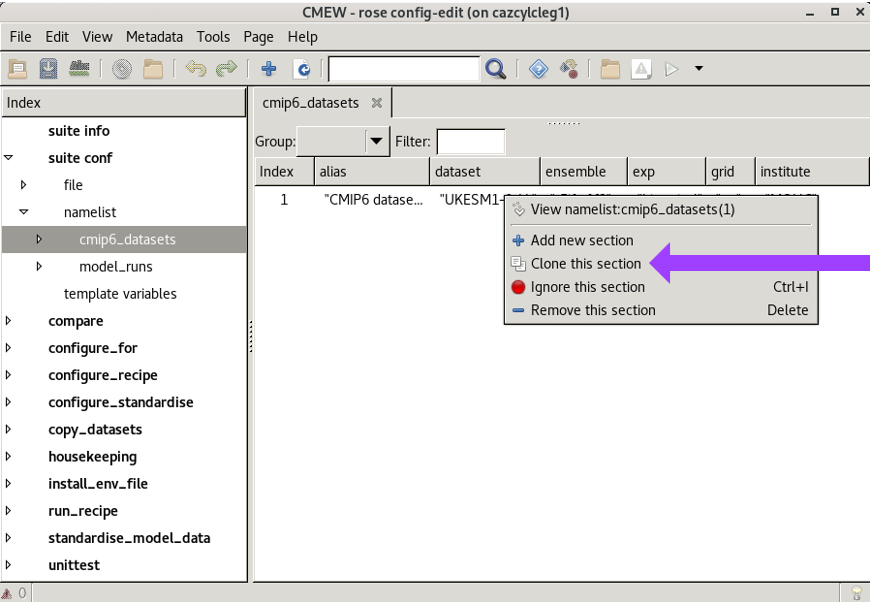
Overwrite the details with those of the new dataset to be added.
Warning
Currently, the recipe “Radiation Budget” will not allow two datasets (such as both a CMIP6 dataset and a model development run) that share a common model ID (such as “HadGEM3-GC31-LL”) to be run in the same workflow.