ANTS Decomposition Framework#
For some processing operations it may not be possible to fit all the operations
and data into memory at the same time. To aid this ANTS provides the
ants.decomposition module which contains code to help you divide your
processing into smaller pieces which can fit into memory and even be run in
parallel. It should not be used as a substitute for writing well optimised code
and/or breaking up processing and workflow steps to make best use of available
compute for the data, domains, and operations concerned. In the first instance
always assess your code and workflow for potential gains before using the
decomposition.
The decomposition framework operates by:
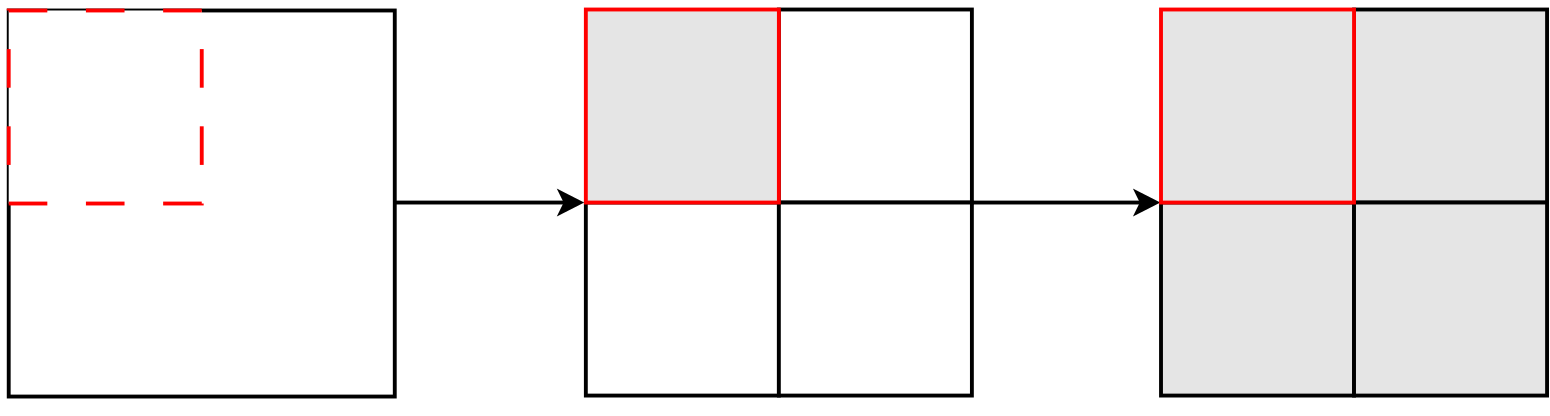
splitting your cubes into sub-cubes
carrying out your processing operation on each of the sub cubes
recombining the processed sub-cubes back into a single cube
Thus, if you are going to use the decomposition then you will need to define a function that can work on a portion of your cube i.e. is not an operation that needs knowledge of all the source data to run.
Decomposition can be applied to unary or binary operations. In the unary case, we work in terms of one dataset at a time, dividing it up into distinct pieces and apply the processing to each of those pieces individually.
In the binary case, we work with source and target datasets being passed in to the same function. In this case the target datasets are split into distinct pieces and each of those pieces is used to retrieve the part of the source dataset that overlaps it. In practice this may mean that some regions of a source dataset are retrieved for multiple different, distinct, target datasets. Having got pairs of source-target pieces the binary operation is then performed on those.
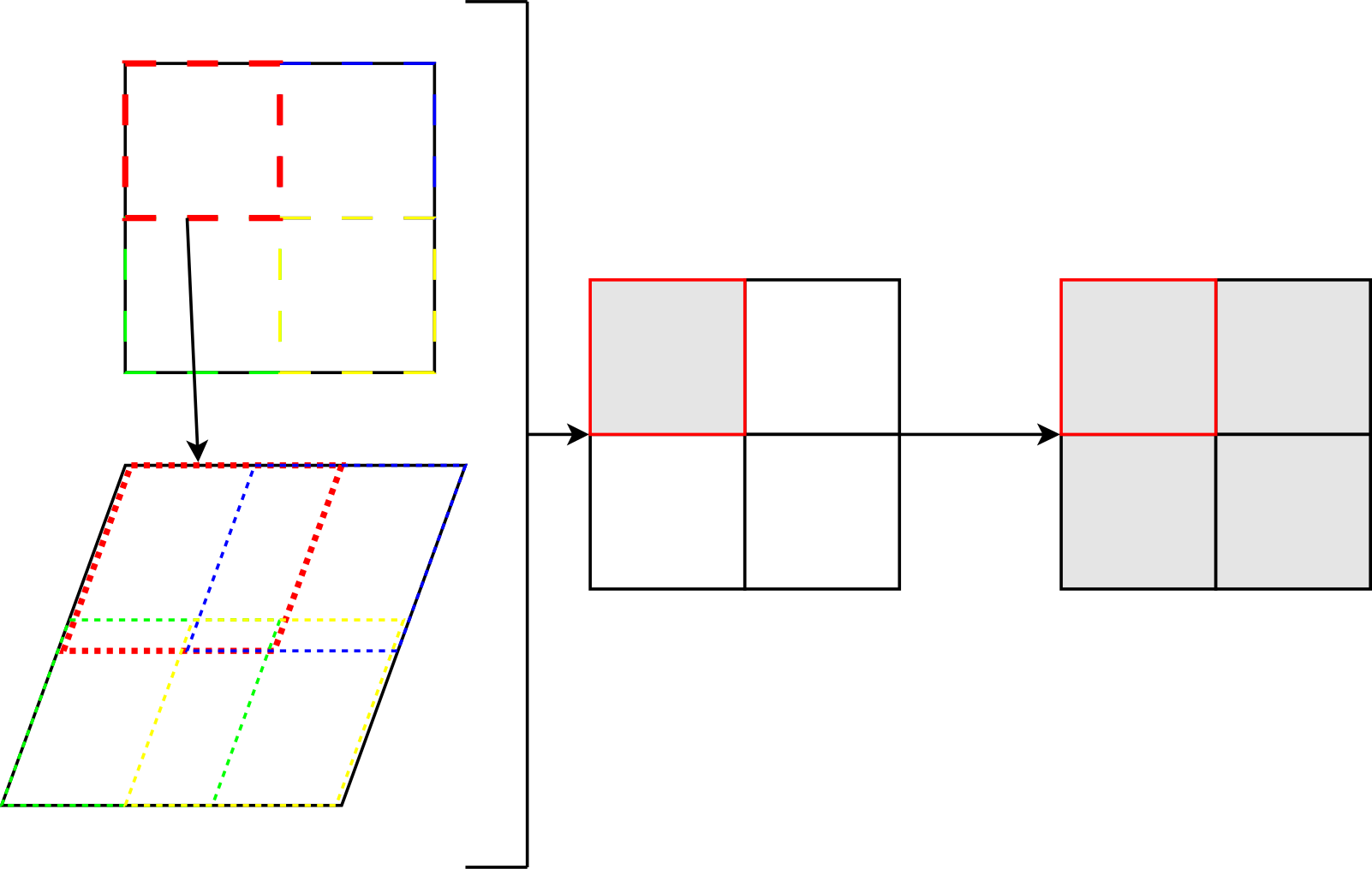
Notice that in the plot here, that while the first dataset is divided into 4 distinct pieces, the related areas in the second one are overlap each other, so are not distinct from one another.
Key Points#
The decomposition framework allows you to apply unary or binary functions to your data by splitting it up into a mosaic of pieces and applying the function to those pieces rather than all the data at once.
The nature of this type of decomposition means:
it is not appropriate for use when global level operations are being carried out
will lose information about the original data being on a global, circular, domain for each of the individual pieces
particular care should be taken to ensure that results are consistent across all possible decompositions
routines being run via the decomposition need to be tested a producing the same results with and without decomposition
it must not be mixed with other parallelisation methods, such as python worker pools
In general:
do not use the decomposition in your code unless it is necessary
other optimisation methods may be better in the first instance
Using Apps with Decomposition#
Setting the temporary files directory#
Underneath the decomposition framework, each of the processed pieces gets
stored to a temporary location on disk. Once all the pieces have been processed
these are loaded back in and recombined. The temporary files are then
cleaned up. Setting the ANTS_TEMPORARY_DIR environment variable allows the user to
choose where potentially large volumes of these temporary working files are
written to. The size of those temporary working files is ultimately defined by
the datasets being processed and the operations being applied.
Configuring decomposition#
By default, decomposition is disabled, even if the code has been set up to use the decomposition framework.
In an ANTS based application, we pass user supplied config files to the
application via an --ants-config <configuration filename> to set our
decomposition configuration. We use these to tell the decomposition framework
the number of chunks to divide the data it is processing into. In the case of a
2x2 split, we would supply a configuration file that looks as follows:
[ants_decomposition]
x_split = 2
y_split = 2
It is possible to configure the size of the overlap to be used when extracting
source pieces. This is set via the pad_width parameter in the configuration,
which speicifes an integer number of cells worth of padding to be added around
each source piece, in all directions. The default pad width is 1.
Building upon the previous example, a 2x2 split with a pad width of 10
would be configured as follows:
[ants_decomposition]
x_split = 2
y_split = 2
pad_width = 10
This feature may be useful if the source and target are on very different coordinate systems, for example regridding from a standard lat-lon grid to a rotated pole domain.
For more details on configuration of ANTS based applications visit the
documentation at ants.config.
Example Implementation in code#
Unary Case#
In the case of a unary function we work only in terms of one data source at a time. Consider the following:
import ants.tests.stock as stock

def add_one(acube):
    """Add 1 to the data in a cube"""
    return acube + 1

# create a sample cube
acube = stock.geodetic(10,10)

# apply function to the cube
result = add_one(acube)
If we then wanted to apply the decomposition framework to it we would update the code as follows:
import ants.tests.stock as stock
import ants.decomposition as decomp

def add_one(acube):
    """Add 1 to the data in a cube"""
    return acube + 1

# create a sample cube
acube = stock.geodetic(10,10)

# use the decomposition to apply the function to our cube
result = decomp.decompose(add_one, acube)
This would result in acube being divided up into pieces by the
decomposition, each piece having the add_one() function applied to it, and
the resulting processed pieces being recombined and returned to result. It is
safe to use the decomposition in this case as the adding of 1 to each element
in the cube data can be carried out independently of adding 1 to each of the
other elements.
Binary Case#
In the binary function case we want to work with paired pieces of data rather than a single data source at a time.
Consider the following:
import ants.tests.stock as stock

def add_cubes(cube1, cube2):
    """Add two cubes together"""
    return cube1 + cube2

# create some cubes
cube1 = stock.geodetic(10,10)
cube2 = stock.geodetic(10,10)

# set some of the data in cube2 to 0
cube2.data[:,5:] = 0


# apply function to the pair of cubes
result = add_cubes(cube1, cube2)
Like the Unary case, our add_cubes() function is an element-wise one,
though this time needs a pair of cubes at a time.
As before, we can apply the decomposition to this code, as follows:
import ants.tests.stock as stock
import ants.decomposition as decomp

def add_cubes(cube1, cube2):
    """Add two cubes together"""
    return cube1 + cube2

# create some cubes
cube1 = stock.geodetic(10,10)
cube2 = stock.geodetic(10,10)

# set some of the data in cube2 to 0
cube2.data[:,5:] = 0

# use the decomposition to apply the function to the pair of cubes
result = decomp.decompose(add_cubes, cube1, cube2)
This results in cube2 - the “target” in decomposition terms - being divided up
into pieces and cube1 - the “source” - being divided up into pieces matching
the same geographic region and those pairs of matching pieces having the
add_cubes function applied to them.
Extended Usage#
In many “real-world” cases, your processing function will have other arguments
in addition to the data to be processed. The python
functools.partial() function can be used here to turn these processing
functions into a form useable by the decomposition framework. You will want to
be familiar with functools.partial() as a general tool, rather than
taking this as a tutorial on how to use it. As a convention though, when
writing functions that take in the datasets to be decomposed in the first 1 or
2 positional arguments and using keyword arguments for remaining.
Taking the case of a unary function as follows:
import ants.tests.stock as stock

def add_value(acube, avalue=0):
    """Add a value to the data in a cube"""
    return acube + avalue

# create a sample cube
acube = stock.geodetic(10,10)

# apply function to the cube
result = add_value(acube, 10)
We see that we have a function, add_value that has an argument to specify
a value to add to the data in a provided cube. We can use
functools.partial() to set the other value(s) to feed into our
function as:
import ants.tests.stock as stock
import ants.decomposition as decomp
from functools import partial

def add_value(acube, avalue=0):
    """Add a value to the data in a cube"""
    return acube + avalue

# create a sample cube
acube = stock.geodetic(10,10)

# set the value of the keyword argument for decomposition framework use
processing_function = partial(add_value, avalue=10)

# use decomposition to apply the function to our cube
result = decomp.decompose(processing_function, acube)
N.B. although it is the unary case covered here, this can be applied to binary operations too.
Inappropriate Usage#
As mentioned previously, we don’t want to apply the decomposition in cases where not having access to the whole cube would be wrong for the function being split up.
Considder the following unary operation:
import ants.tests.stock as stock
import numpy as np

def set_to_mean(acube):
    """Set the data to the mean of the input data"""
    result = acube.copy()
    result.data[:,:] = np.mean(acube.data)
    return result

# create a sample cube
acube = ants.tests.stock.geodetic((2,2),data=[[1.,2.],[3.,4.]])

# apply function to the cube
result = set_to_mean(acube)
In this case we set the values of the data elements of the returned cube to
the mean of the data in the input cube. Supplying a cube with data values
[[1.,2.],[3.,4.]] we would expect a returned cube with data values
[[2.5,2.5],[2.5,2.5]].
In theory, we could apply the decomposition framework as:
import ants.tests.stock as stock
import ants.decomposition as decomp
import numpy as np

def set_to_mean(acube):
    """Set the data to the mean of the input data"""
    result = acube.copy()
    result.data[:,:] = np.mean(acube.data)
    return result

# create a sample cube
acube = ants.tests.stock.geodetic((2,2),data=[[1.,2.],[3.,4.]])

# apply function to the cube
result = decomp.decompose(set_to_mean, acube)
However, if we were then to subsequently run the code with a 2 by 2
decomposition - split the data into four pieces, once in the x direction, once
in the y direction - we would then be supplying the set_to_mean()
function with incomplete data for the needs of its operation. In this case,
the resulting data would be [[1.,2.],[3.,4.]], which is not the desired
result.
Testing#
When using decomposition it is important to test thoroughly. As a general rule we recommend testing with each of the following configurations as a minimum:
[ants_decomposition]
x_split = 0
y_split = 0
This configuration disables the decomposition, and should give you the same result as if you had not run the routine through the decomposition in the first place.
[ants_decomposition]
x_split = 1
y_split = 1
This configuration turns on the decomposition, but results in a single “piece” being fed through the decomposition framework. If things are working correctly this should produce the same result as the split = 0 configuration previously.
[ants_decomposition]
x_split = 2
y_split = 2
This configuration turns on the decomposition splitting the data into a 2 by 2 mosaic of pieces. Again, if things are working correctly you should get the same result as the split = 0 configuration previously. If not, then you need to investigate the underlying cause - most likely that your function cannot be decomposed in this way.