

Testing#
Comprehensive and automated testing is an essential aspect of successful software development. Comprehensive because we can’t find bugs in code we aren’t testing. Automated because tests which aren’t run aren’t catching bugs.
The LFRic project makes use of functional testing whereby a known set of input stimuli are presented to a piece of code and the resulting output is compared to expected results.
Reasons For Testing#
There are several reasons to test code, these can be summarised as Correctness, Regression and Failure mode. These will be discussed shortly but it is important to understand that while they can pull in the same direction they can also pull in different directions. It may, therefore, be necessary to write several tests to do different things.
Correctness Testing#
The most obvious thing a functional test can do is to test that the unit under test produces the correct answer, given the inputs.
In a perfect world, the test is written first (and by a different developer) so it is informed only by the expected correct behaviour and not at all by knowledge of the implementation. In the real world this is often not possible but the developer should still do their best to divorce themselves from their knowledge of the implementation.
A numerical integration is an example of the ideal circumstance for correctness testing; a function is used to generate the input data and an analytical solution for the integral of that function is used to determine the expected output.
In this case we are very much testing the function of the numerical integration and not its implementation.
The inputs are an array of hard-coded values (feel free to provide the function used to generate them as a comment) and likewise the expected result is also provided as a literal value. (Again, feel free to provide the derivation of the integral in a comment)
If providing hand calculated values as inputs seems like too much work it may be a sign that your input dataset is too large. Ask yourself if you need that many data points for an effective test.
While normally we try to avoid arbitrary “magic numbers” in our code, in testing we embrace them. A constant value cannot unexpectedly change its value in the way a calculation might.
Why are calculations viewed with suspicion? Because it is all too easy to have them unexpectedly dependent on some value which may get changed without notice.
For instance, imagine calculating the mean of an array. If that array changes size the mean will likely change. Now if that array is coming from the code under test it can change without any notice.
Calculations involving only local data are safe but you have to be very sure they do use only local data.
The biggest pitfall with calculations is that the one being used for testing may be the same as the one being tested. Obviously a calculation can’t test itself for correctness!
Regression Testing#
The second testing super-power comes under the banner of “regression testing.”
Obviously this type of testing is intended to prevent “regression,” but what does that mean?
The first kind of regression is where modifications to the code under test causes it to behave differently to the expected behaviour of the tests. This can sometimes be the intent of the change, in which case the tests will need to be updated to reflect this.
Often this is an unintended consequence of fixing or adding a feature. The goal of regression testing, in this case, is to make sure that no matter how much the code under test is changed, it always honours the contract of its interface.
Which is to say, the same input data produces the same results.
The value of this is exactly that it allows the implementation to be improved and optimised while retaining some confidence that it is still working correctly. In that sense it is an extension of correctness testing.
The other major aspect of regression testing is to try and prevent back-sliding when bug fixes are applied. It is surprisingly common, after a bug has been fixed, for the bug to re-appear. This can happen for a number of reasons, all of them annoying.
In this mode a new test is written which exercises the bug and is importantly done before a fix is attempted. There are three reasons for writing the test before fixing the bug.
In the case where the bug is not entirely understood it can be a valuable tool in gaining that complete understanding.
Once a fix has been implemented it allows us to prove that it does, indeed, fix the bug as the failing test will now pass.
Finally, it means subsequent changes can’t recreate the bug as there is now a test which will fail if they do. The fact that it has failed in this way in the past proves that this is a possible failure-mode.
Failure-mode and Edge-case Testing#
The final aspect of functional testing is a bit of a rag-bag of apparently unrelated stuff but can broadly be thought of as trying to anticipate what might go wrong.
This is particularly important when dealing with user input. There is no guarantee that the user is going to pass us what we asked for. We should treat such data with suspicion. As such it’s important to test how our code behaves when, for instance, a negative number is passed to a value which must be positive.
Even when we are not dealing directly with user input it is important to test for likely fault conditions. What happens when the file we want to read doesn’t exist? What happens when a list is empty?
A very common source of errors are around boundaries. If a unit expects input in a range, check what happens when you pass values just inside, and just outside, the range. Make sure you don’t have an “out by one” error in there.
If your unit can accept zero as an input, test it. Because of the possibility of “divide by zero” errors it’s important to test.
Granularity of Testing#
Functional testing is a continuum from fine to coarse grained.
The finest grained end is “unit testing” where code “units” are tested. This usually means individual procedures. This testing is very good at isolating faults to a small piece of code but it can’t tell you how these units interact with each other.
The coarsest grained end is “system testing” where the complete executable is tested. This is the ultimate test of interaction between units but is poor at isolating a problem. Our “Rose stem” test suite is an example of system testing.
Between the two is “integration testing” which considers clusters of units. This allows a sub-set of interactions to be exercised while still allowing for reasonable isolation.

Fig. 11 The functional testing continuum.#
A good testing regime makes use of all these approaches.
Note that the boundaries are not hard drawn. A unit test may well call down to procedures further down the call tree. Thus the unit test is testing multiple units. Meanwhile an integration test may be testing a substantial fraction of the whole system.
Where these boundaries are drawn is a matter of ongoing discussion and debate, outwith the scope of this document.
Be aware that “integration testing” is also used to refer to the testing of interaction between systems and so also sits beyond “system testing.” This is not illustrated above for simplicity. It is the same basic concept but at different scale. The systems and their interactions become the units under test.
There is an element of this inter-system integration testing in our “Rose stem” suite. The mesh generator is built, then used to generate meshes which are then loaded by models. Thus the interaction between mesh generator and model is tested.
Testing In Depth#
Similar to the military concept of “defence in depth,” we test our code multiple times with different techniques. Our unit tests are testing the same code as our system tests.
So why this apparent duplication? Why add unit testing in addition to system testing?
The simple answer is that our system tests hardly scratch the surface of all possible execution paths the code can take. But more abstractly, imagine a slice of Swiss cheese. Now imagine trying to push a chopstick through it.
Most of the time you will hit cheese and progress will be arrested.
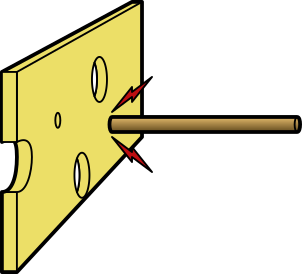
Fig. 12 Chopstick intercepted by cheese.#
In this analogy, the chopstick represents a bug and the cheese represents your testing. When the chopstick strikes cheese, the testing has detected the bug.
As noted above, no testing regime is ever perfect, with the best will in the world it is going to have holes. Like our cheese.
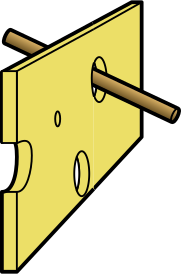
Fig. 13 Chopstick passes through a hole in the cheese.#
In those cases, the chopstick is able to pass through the hole. If the cheese represents the totality of our testing, the chopstick/bug is able to escape and wreak havoc on our model runs.
If we stack a second piece of cheese, with a different pattern of holes, behind the first, we greatly increase our chance of preventing the chopstick passing through.
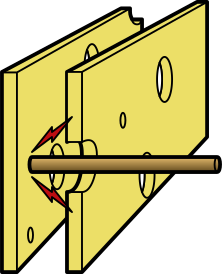
Fig. 14 Chopstick intercepted by a second slice of cheese.#
Testing in depth is an acknowledgement that no set of tests will provide perfect coverage but several sets will have far fewer overlapping holes.
It is also important to emphasis the points from previous section. We also use different tests for ostensibly the same code because they test different things and have different capabilities. Remember, a system test will reveal errors in the interaction between all the components of the system, but a failure tells you only that “you have a bug.” Meanwhile a unit test tells us nothing about the interaction of components, but a failure tells you “there is a bug in this procedure.” A procedure which may only be 5 lines long.