

The Data Model (Simple Diffusion)#
This tutorial is designed to provide an introduction to the LFRic data model and how to write kernels to perform calculations on the data held within a field.
The kernel performs the diffusion calculation on a tracer field, and we will be modifying it to extend its capability to include diffusion in both horizontal directions of mesh cells.
Note
This tutorial assumes you have already set up your environment with the required dependencies as described in the Software dependencies of LFRic section of this documentation.
Cloning the Repository#
The source code for the simple diffusion application is available in the LFRic repository. To clone the repository, you can use the following command:
git clone https://github.com/metoffice/lfric_core.git
Alternatively, if you have a GitHub account, you can fork the repository and clone your forked version. This is the method you would follow if you intend to make changes to the code and submit a pull request.
For more details on the working practices for contributing to the LFRic Core/Apps codebase, please refer to the Simulation Systems documentation.
The Application Layout#
simple_diffusion
├── bin
├── build
├── documentation
├── example
├── Makefile
├── metadata
├── optimisation
├── rose-meta
├── source
├── unit-test
└── working
The above listing shows the directory structure of the
simple diffusion application directory. Highlighted are the directories that
are important for this tutorial. The bin and working directories
are generated during the build process and are not present in the repository.
The rose-meta directory contains metadata that is used both by the Rose
application configuration system and by the LFRic configuration system.
The Makefile is used to build the application. Finally, the
source directory contains the source code for the application and the
example directory contains a canned test that can be run from the
command line to demonstrate and test the application.
Have a go
To build the simple-diffusion application first navigate to the
application directory:
cd applications/simple_diffusion
Then run the build command:
make build
Once the application has been built you should see a new bin
directory containing the executable. You can then run the application with
the canned test in the example directory with the following commands:
cd example
../bin/simple_diffusion configuration.nml
On successful completion of the application you should see a log message stating
20260608150939.585+0100:INFO : simple_diffusion application completed.
You may wish to visualise the output of the application. The output files
are in an unstructured UGRID NetCDF format, the output file is called
diffusion_diag.nc. This can be visualised using
GeoVista.
The Model Structure#
LFRic applications are developed around the
PSyKAl design which governs the separation of
concerns between the scientific code and the technical code. This design can
be best described by the PSyKAl diagram. The layout of the source
code in the source directory reflects this design, with the scientific
code being contained in the algorithm and kernel directories.
The Parallel System (PSy) Layer code is generated at build time by the
PSyclone domain specific compiler, details on this aspect
of LFRic will not be covered in detail in this tutorial.
source
├── algorithm
│   ├── simple_diffusion_alg_mod.x90
│   └── simple_diffusion_constants_mod.x90
├── driver
│   ├── init_simple_diffusion_mod.F90
│   ├── simple_diffusion_driver_mod.f90
│   └── simple_diffusion_mod.f90
├── kernel
│   └── tracer_tutorial_diff_kernel_mod.F90
└── simple_diffusion.f90
The source listing shows the source files for the
simple diffusion application. The driver directory contains the driver
code for the application, which is responsible for setting up the simulation and
calling the algorithm code. The algorithm directory contains the
scientific algorithms that perform calculations on whole fields by either
calling PSyclone builtins or by calling
kernels. All algorithms that require PSyclone must have the file extension
.x90 to indicate that they are PSyclone compatible. The kernel
directory contains the kernels that can be called from the algorithm code to
perform calculations on a single mesh cell.
In the algorithms calls to builtins and kernels are made through calls using
the PSyclone invoke keyword. This is used as if it were a subroutine
call, but the code that is executed when the application is run is generated at
build time by PSyclone. For example, the following code snippet is taken from
the simple_diffusion_alg_mod.x90 file and shows the use of a PSyclone
builtin that performs and increment update of a field by adding the second field
to the first and returning it (i.e. field1 = field1 + field2).
89 call invoke( inc_X_plus_Y( field_in, dfield_in ) )
A list of available builtins can be found in the LFRic builtins section of the PSyclone documentation.
Kernels are called using the same invoke keyword, but instead of
calling a builtin, the name of the kernel is used. For example, the following
code snippet is taken from the simple_diffusion_alg_mod.x90 file and
shows the use of the tracer_tutorial_diff_kernel kernel.
75    call invoke( name = "compute_diffusion", &
76                 setval_c(visc, visc_val), &
77                 setval_c(dfield_in, 0.0_r_def), &
78                 tracer_tutorial_diff_kernel_type(dfield_in, &
79                                                  field_in, &
80                                                  stencil_depth, &
81                                                  visc, &
82                                                  dx_at_w2) )
As you can see, multiple kernels and builtins can be called in the same invoke statement, and the order of execution is determined by the order in which they are listed in the invoke statement. Invoke statements can (but aren’t required to) have names which are used to define the subroutine names in the generated PSy layer code. This can be useful for debugging and optimisation purposes.
When calling a kernel via an invoke statement, the arguments that are passed to the kernel are defined by the kernel metadata.
33  type, public, extends(kernel_type) :: tracer_tutorial_diff_kernel_type
34    private
35    type(arg_type) :: meta_args(4) = (/                                     &
36         arg_type(GH_FIELD,   GH_REAL, GH_WRITE, Wtheta),                   &
37         arg_type(GH_FIELD,   GH_REAL, GH_READ,  Wtheta, STENCIL(CROSS)),   &
38         arg_type(GH_FIELD,   GH_REAL, GH_READ,  Wtheta),                   &
39         arg_type(GH_FIELD,   GH_REAL, GH_READ,  W2)                        &
40         /)
41    integer :: operates_on = CELL_COLUMN
42  contains
43    procedure, nopass :: tracer_tutorial_diff_code
44  end type
Kernel metadata is used to define both the arguments that need to be passed
to the kernel type from the invoke statement and to tell PSyclone how to
generate the PSylayer code which calls the kernel _code subroutine.
For example, the kernel metadata snippet above
defines four fields. The first field is the tracer field that we want to
diffuse. The field is defined with four arguments in the metadata,
GH_FIELD indicates that the argument is a field, GH_REAL
defines the kind of the field data, GH_WRITE indicates that the kernel
will write to this field, and Wtheta tells us that the field is defined
on the Wtheta function space. Detailed information on the different argument
types and their properties can be found in the PSyclone
LFRic API Metadata documentation.
PSyclone uses the kernel metadata to generate the PSy layer code that calls the
kernel. The generated call will match the subroutine signature of the kernel
_code subroutine. For example, the following code snippet is taken from
the tracer_tutorial_diff_kernel_mod.F90 file and shows the subroutine
signature. The first argument is always the number of layers in the Mesh of the
first field in the kernel metadata. The next arguments are the field data
arrays in the order defined in the kernel metadata. Also notice how the second
field has two additional arguments that appear directly following the field data
array. These are the stencil size and the stencil array for the second field.
This stencil information is defined in the metadata as STENCIL(CROSS).
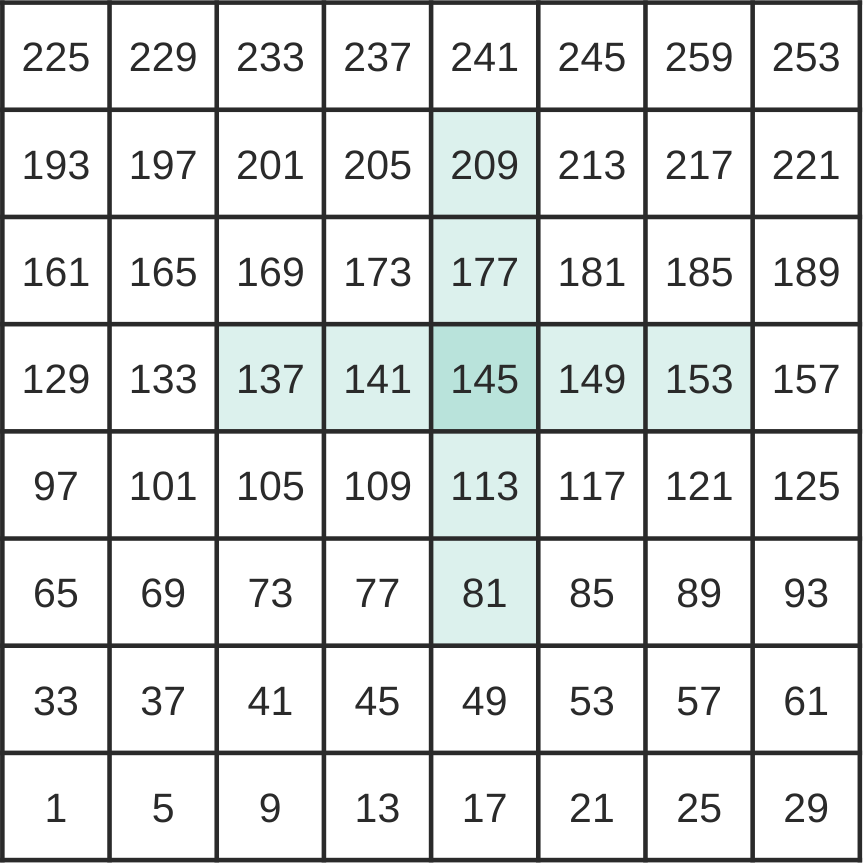
Fig. 1 Example of what a depth two stencil for a cell-centred field with 4 layers on an 8x8 mesh might look like. The image shows the bottom layer of the field. As DoFs are held in columns, accessing the DoF in the cell above is a simple matter of adding 1 to the DoF value, as such only the bottom layer of DoFs are held in DoF-maps.#

Fig. 2 Example of what the stencil DoFmap for the cell with DoF number 145 would look like. The order of the stencil DoFmap starts in the centre and goes out along each branch in the order of West, South, East, North.#
69subroutine tracer_tutorial_diff_code( nlayers,                              &
70                                      theta_inc,                            &
71                                      theta_n,                              &
72                                      map_wt_stencil_size, map_wt_stencil,  &
73                                      visc_h,                               &
74                                      dx_at_w2,                             &
75                                      ndf_wt, undf_wt, map_wt,              &
76                                      ndf_w2, undf_w2, map_w2               &
77                                     )
The kernel code itself performs a diffusion calculation on the tracer field using the Heat equation with a diffusion coefficient D.
To solve this in LFRic we use a central difference scheme in space and explicit forward time stepping.
To do this in the kernel we use the stencil information for the second field to access the values of the field in the neighbouring cells and calculate the diffusion update for the tracer field. This increment value is then added to the tracer field using a PSyclone builtin in the algorithm code.
Have a go
Currently the kernel only performs the diffusion calculation in the x direction. Here you will extend the kernel to perform the diffusion calculation in the y direction as well (the x and y directions are in reference to a single cell, the x direction of a cell on one panel of a cubed sphere may not be the same as that of a cell on another panel). This will require us to modify the kernel to access the values of the field in the y direction and to calculate the additional \(\frac{\partial^2\phi}{\partial y}\) term in the diffusion calculation.
The main points to consider when adding the additional diffusion term are:
The location of the values in the field array for the cell at the base of the column the kernel is operating on are defined by the DoF values in the DoFmap for the field (e.g. map_w2 for the field
dx_at_w2).The location of the values in the field array for the neighbouring cells are defined by the stencil DoFmap for the field (e.g.
map_wt_stencilfor the fieldtheta_n).
The sections of the kernel code that need to be modified are those that calculate the horizontal grid spacing:
131  do k = 1, nlayers - 1
132    idx2(k) = (2.0_r_def/(dx_at_w2(map_w2(1)+k)+dx_at_w2(map_w2(3)+k)))**2
133  end do
and those that calculate the diffusion increment:
140  do k = 1, nlayers - 1
141    d2dx = (theta_n(map_wt_stencil(1,2) + k)  - 2.0_r_def*theta_n(map_wt_stencil(1,1) + k) +      &
142            theta_n(map_wt_stencil(1,4) + k) ) * idx2(k)
143    theta_inc(map_wt(1) + k) = visc_h(map_wt(1) + k) * (d2dx)
144  end do