



Working with .zarr and .nc output files#
This notebook demonstrates how to work with the .zarr output files generated by the standard ProFSea workflow. Zarr is a powerful python library designed for the efficient storage of large-scale scientific data, allowing for the fast reading and writing of n-dimensional arrays. In the following, we outline some key functionalities of the .zarr output file format, and how this can be converted to other commonly used formats.
In worked_example.ipynb, spatial relative sea-level rise projections were saved to stabilisation_projection.zarr as
spatial_model.save_components(
    spatial_model.results,
    scenario_name="stabilisation",
    output_format="zarr",
)
which saves the relative sea-level rise projections as an xarray.Dataset containing gridded projections for each component of the spatial model (see utils.save_components() for more details).
Alternatively, you can save the output in NetCDF format by setting output_format="netcdf". However, saving to NetCDF may be slower than saving to Zarr.
To work with .zarr output file, the first step is therefore to activate the profsea conda environment and import the xarray library:
[1]:
import xarray as xr
Reading .zarr files#
Reading the .zarr file is then straightforward. Below, we print the xarray dataset, which outlines:
the coordinates stored in the file (for example
time,lat,lon, andpercentile);the data variables corresponding to each sea-level component (for example
sterodynamic,greenland,landwater,wais,eais,glacier, andgia);the dimensions and shape of each variable;
dataset-level metadata, such as the ProFSea version, scenario name, and description.
Having loaded in this dataset, we can see the benefit of using the .zarr format for very large data files (here, ~5GB): only the metadata is loaded initially, with the underlying data remaining on disk until needed..
[2]:
ds = xr.open_zarr(
    "./stabilisation_projection.zarr",
    consolidated=True,
)

print(ds, '\n\n')

print(f'Data variables: {list(ds.data_vars)}')
<xarray.Dataset> Size: 5GB
Dimensions:       (percentile: 5, time: 295, lat: 180, lon: 360)
Coordinates:
  * percentile    (percentile) int64 40B 5 17 50 83 95
  * time          (time) int64 2kB 2006 2007 2008 2009 ... 2297 2298 2299 2300
  * lat           (lat) float64 1kB -89.5 -88.5 -87.5 -86.5 ... 87.5 88.5 89.5
  * lon           (lon) float64 3kB -179.5 -178.5 -177.5 ... 177.5 178.5 179.5
Data variables:
    eais          (percentile, time, lat, lon) float32 382MB dask.array<chunksize=(5, 295, 10, 10), meta=np.ndarray>
    gia           (percentile, time, lat, lon) float64 765MB dask.array<chunksize=(5, 295, 10, 10), meta=np.ndarray>
    glacier       (percentile, time, lat, lon) float64 765MB dask.array<chunksize=(5, 295, 10, 10), meta=np.ndarray>
    greenland     (percentile, time, lat, lon) float32 382MB dask.array<chunksize=(5, 295, 10, 10), meta=np.ndarray>
    landwater     (percentile, time, lat, lon) float32 382MB dask.array<chunksize=(5, 295, 10, 10), meta=np.ndarray>
    sterodynamic  (percentile, time, lat, lon) float64 765MB dask.array<chunksize=(5, 295, 10, 10), meta=np.ndarray>
    total_rsl     (percentile, time, lat, lon) float64 765MB dask.array<chunksize=(5, 295, 10, 10), meta=np.ndarray>
    wais          (percentile, time, lat, lon) float32 382MB dask.array<chunksize=(5, 295, 10, 10), meta=np.ndarray>
Attributes:
    source:       ProFSea v3.0
    scenario:     stabilisation
    description:  Spatial sea level rise projections


Data variables: ['eais', 'gia', 'glacier', 'greenland', 'landwater', 'sterodynamic', 'total_rsl', 'wais']
Extracting data#
Having loaded in the .zarr output file, we can now extract the data for individual components. To inspect the contribution from GIA is as simple as,
GIA = ds["GIA"]
Instead of working with the full 4-D array, we can instead select individual percentiles, which reduces the local data volume dramatically (approximately five-fold):
[3]:
GIA = ds["gia"].sel(percentile=50)

GIA
[3]:
<xarray.DataArray 'gia' (time: 295, lat: 180, lon: 360)> Size: 153MB
dask.array<getitem, shape=(295, 180, 360), dtype=float64, chunksize=(295, 10, 10), chunktype=numpy.ndarray>
Coordinates:
  * time        (time) int64 2kB 2006 2007 2008 2009 ... 2297 2298 2299 2300
  * lat         (lat) float64 1kB -89.5 -88.5 -87.5 -86.5 ... 87.5 88.5 89.5
  * lon         (lon) float64 3kB -179.5 -178.5 -177.5 ... 177.5 178.5 179.5
    percentile  int64 8B 50
Attributes:
    units:      m
    long_name:  Regional gia sea-level projections
source: ProFSea-Climate v0.1At this stage, GIA is still lazily loaded and is divided into many smaller chunks that can be accessed independently. We can therefore efficiently extract only the subset of data required for a particular analysis, without first loading the entire dataset into memory. Below, we demonstrate several common visualisation and analysis workflows.
[4]:
year = 2300
gia_2300 = GIA.sel(time=year) # extract 50th percentile projection for 2300 at all (lat, lon) grid points

import cartopy.crs as ccrs
import matplotlib.pyplot as plt
import numpy as np

fig = plt.figure(figsize=(6, 4), layout="constrained")

vmax = np.nanmax(np.abs(gia_2300))
vmin = -vmax

ax = fig.add_subplot(111, projection=ccrs.PlateCarree())
ax.set_title(f"GIA Contribution (50th Percentile, Year {year})")

mesh = ax.pcolormesh(
    gia_2300.lon,
    gia_2300.lat,
    gia_2300,
    transform=ccrs.PlateCarree(),
    cmap="RdBu_r",
    vmin=vmin,
    vmax=vmax,
)

ax.coastlines()

fig.colorbar(
    mesh,
    label="Relative Sea Level (m)",
    orientation="horizontal",
    pad=0.02,
)

plt.show()
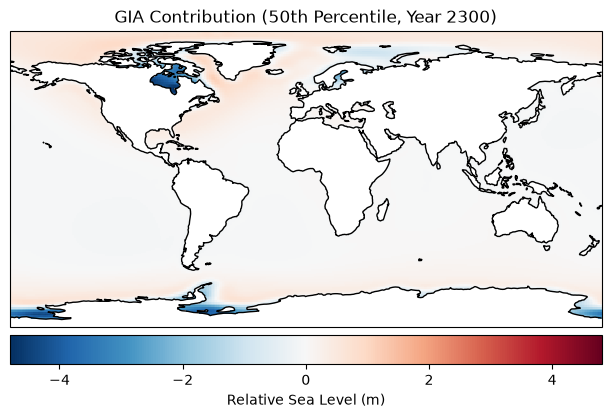
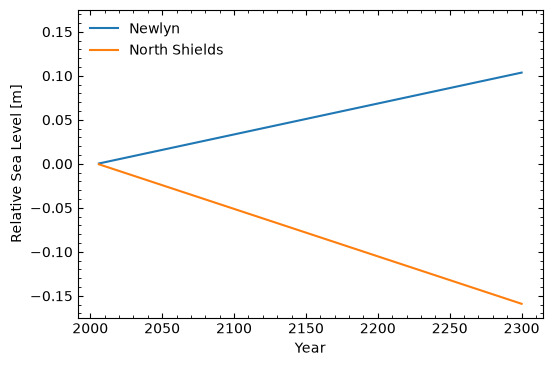
Instead of plotting a map for a particular time, we can instead plot the timeseries (of the 50th percentile RSL projection) for particular locations. As can be seen below, the newlyn and north_shields objects have only a single dimension, time, making analysis and visualisation straightfoward.
After selecting a single grid cell, the spatial dimensions are removed and only the time dimension remains. As a result, the resulting dataset is only ~2 kB, compared to the original ~5 GB Zarr archive.
[5]:
# The requested latitude and longitude are matched to the nearest available model grid cell using method="nearest".
newlyn = GIA.sel(
    lat=50.1030,
    lon=-5.5428,
    method="nearest",
)
north_shields = GIA.sel(
    lat=55.016,
    lon=-1.449,
    method="nearest"
)

vmax = 1.1 * np.maximum(np.nanmax(np.abs(newlyn.values)), np.nanmax(np.abs(north_shields.values)))

import matplotlib.pyplot as plt

_ = plt.figure(figsize=(6, 4))

plt.plot(newlyn.time.values, newlyn.values, label='Newlyn')
plt.plot(north_shields.time.values, north_shields.values, label='North Shields')

plt.ylim(-vmax, vmax)

plt.xlabel('Year')
plt.ylabel('Relative Sea Level [m]')

plt.minorticks_on()
plt.gca().tick_params(which='both', direction='in', left=True, right=True, top=True, bottom=True)

plt.legend(frameon=False, loc='upper left')

plt.show()
plt.close()

newlyn
[5]:
<xarray.DataArray 'gia' (time: 295)> Size: 2kB
dask.array<getitem, shape=(295,), dtype=float64, chunksize=(295,), chunktype=numpy.ndarray>
Coordinates:
  * time        (time) int64 2kB 2006 2007 2008 2009 ... 2297 2298 2299 2300
    lat         float64 8B 50.5
    lon         float64 8B -5.5
    percentile  int64 8B 50
Attributes:
    units:      m
    long_name:  Regional gia sea-level projections
source: ProFSea-Climate v0.1Saving data to other output file formats#
Having extracted only the data we are interested in – in this example, RSL projections for Newlyn and North Shields – we can now save this data to standard data formats (having avoided reading the whole data file into memory). We include several examples below:
[6]:
# NB this converts to a pandas dataframe as intermediate step
newlyn.to_dataframe().to_csv(
    "newlyn_GIA_RSL_timeseries.csv"
) # saving 50th percentile GIA RSL projections for Newlyn.
[7]:
gia_2300.to_netcdf(
    "gia_2300.nc"
) # saving to netcdf using built-in xarray method for 2D DataArray at year 2300
[ ]: